

Advancing Pakistan’s Digital Horizon: Verifying 5G Compatibility
Pakistan stands at the precipice of a significant digital transformation with the imminent launch of 5G services. This strategic national advancement mandates that citizens proactively prepare their devices. Therefore, it is critical to verify 5G compatibility for your phone now, ensuring seamless access to this next-generation cellular network. Many contemporary Android devices explicitly feature “5G” in their model names, simplifying initial identification. However, definitive verification often requires a more calibrated approach.
The Translation: Decoding 5G Readiness
The transition to 5G is not merely an upgrade; it is a foundational shift in network architecture. For your device to function optimally on this advanced infrastructure, it must possess specific hardware capabilities and software configurations. Essentially, a 5G-enabled phone integrates specialized modem technology and supports the distinct frequency bands allocated for 5G deployment within Pakistan. Without these calibrated internal components, a device cannot process the higher bandwidth and lower latency signals inherent to 5G. Furthermore, iPhones released post-iPhone 11 natively support 5G, streamlining their readiness assessment.

The Socio-Economic Impact: Empowering Daily Life
The activation of 5G will profoundly reshape the daily lives of Pakistani citizens, acting as a potent catalyst for economic growth and societal efficiency. Students in urban centers will experience ultra-fast downloads for educational content, while professionals across various sectors will benefit from real-time data access and enhanced remote collaboration capabilities. In rural Pakistan, where reliable connectivity is often a challenge, 5G offers the structural potential for improved digital inclusion, facilitating access to online learning, telemedicine, and e-commerce platforms. Consequently, understanding your device’s 5G compatibility directly translates into readiness for these transformative opportunities.
The “Forward Path”: A Momentum Shift
This impending 5G rollout undeniably represents a Momentum Shift for Pakistan. It signifies a decisive leap into the global digital economy, fostering innovation and attracting technological investment. The strategic deployment of 5G infrastructure, coupled with an informed populace prepared to leverage it, will accelerate national productivity and enhance overall system efficiency. This is not merely a maintenance upgrade but a structural re-engineering of our digital landscape, positioning Pakistan for sustained technological leadership.
Calibrated Methods to Verify 5G Compatibility
Confirming your phone’s 5G readiness requires a precise, multi-step validation process. Several systematic checks ensure accurate assessment of your device’s hardware and software capabilities. These methods provide a comprehensive baseline for evaluating connectivity potential. Therefore, diligently verify 5G compatibility using the following steps.
1. Navigate Device Settings: The Baseline Check
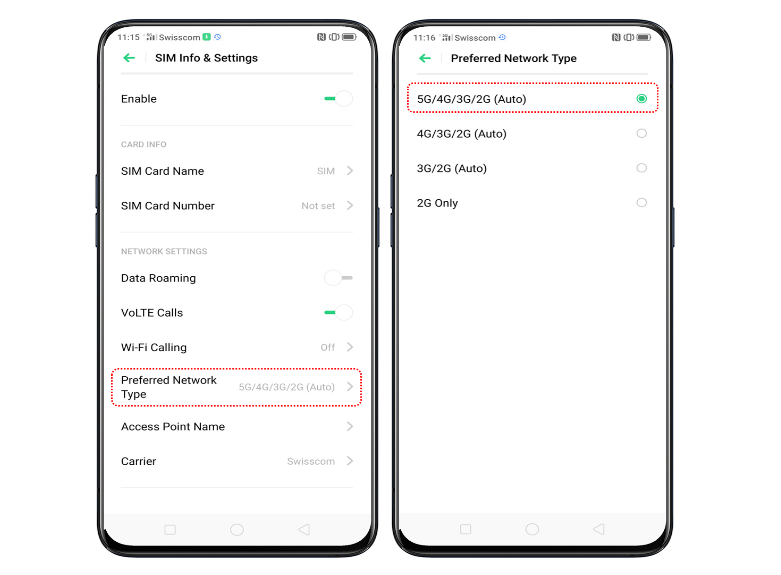
The most direct method to ascertain 5G support involves scrutinizing your phone’s network settings. This internal diagnostic provides immediate feedback on your device’s cellular capabilities. Therefore, a careful review of these options is paramount.
- Go to Settings.
- Tap Network & Internet or Connections.
- Select Mobile Network.
- Look for Preferred Network Type or Network Mode.
If options such as “5G / 4G / 3G” or “5G Auto” are visible, your phone structurally supports 5G. Conversely, the absence of these specific options indicates a limitation to 4G/LTE or lower networks.

2. Online Specification Verification: External Data Validation
When device settings do not provide conclusive information, external online resources offer a robust verification pathway. This method leverages global databases to confirm the technical specifications of your phone model. Hence, it offers a crucial cross-reference for hardware support, allowing you to effectively verify 5G compatibility.
- Access Settings > About Phone to locate your model name or number.
- Utilize a search engine (e.g., Google) to query “Samsung Galaxy A32 specs” or similar.
- Consult official brand websites or trusted technology portals like GSMArena or ProPakistani’s ProPrice.
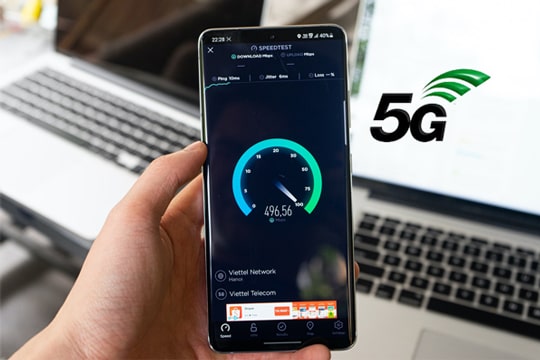
A clear listing of 5G under network support confirms hardware compatibility, irrespective of current network enablement. This strategic check provides definitive proof.
3. IMEI Compatibility Check: Unique Device Identification
Every mobile device possesses a unique International Mobile Equipment Identity (IMEI) number, serving as a critical identifier for network compatibility. This precision tool allows for specific device-to-network matching, addressing variations in band support. Consequently, an IMEI check provides granular insight.
How to Retrieve Your IMEI:
- Dial *#06# on your phone.
- Alternatively, navigate to Settings > About Phone (or search “IMEI”).
Performing the Check:
- Input your IMEI number onto a specialized website such as IMEi Info.
This advanced method is particularly valuable for identifying whether your specific device supports the precise 5G bands utilized by local carriers, a critical factor for optimal connectivity. Use it to thoroughly verify 5G compatibility.

4. Observing the 5G Icon: Real-Time Network Indicator
In areas with active 5G coverage, a “5G” symbol appearing in your phone’s status bar offers a real-time indication of network connection. This visual cue provides instant feedback on current operational status. However, its absence does not definitively rule out 5G compatibility.
- A visible 5G icon signifies an active connection to a 5G network.
- Conversely, the absence of the icon might stem from:
- Lack of 5G coverage in your immediate vicinity.
- Manual deactivation of 5G in device settings.
- Specific network restrictions impacting connectivity.
Therefore, consider this a dynamic indicator rather than a static compatibility proof. It’s one data point when you verify 5G compatibility.
5. Validating Supported 5G Bands: Regional Specificity
The global standardization of 5G involves various frequency bands, meaning a phone compatible in one region might not fully operate in another. Your device must support the specific 5G frequency bands deployed within Pakistan. This ensures hardware alignment with national network infrastructure. Thus, band validation is a critical step, allowing you to accurately verify 5G compatibility.
- Different nations implement distinct 5G frequency bands.
- If your phone lacks support for Pakistan’s specific bands, 5G functionality may be compromised despite general 5G enablement.
Locate supported bands within official product specifications, reliable tech review sites like GSMArena, or manufacturer product pages. This detailed analysis prevents potential connectivity discrepancies.

6. Software Update Implementation: Enabling Latent Capabilities
Periodically, manufacturers enable or optimize 5G functionality through software updates. Ensuring your phone runs the latest operating system version can unlock latent 5G capabilities or enhance existing performance. This proactive measure maintains optimal device functionality. Consequently, routine updates are essential to verify 5G compatibility and ensure maximum performance.
- Navigate to Settings > Software Update.
- Install the most recent available software version.
In specific instances, original equipment manufacturers (OEMs) strategically activate 5G support post-release, adapting to network evolution. Therefore, maintaining updated software is a foundational element for comprehensive 5G readiness.