

Microsoft is currently deploying a calibrated redesign for the Windows 11 Search interface, prioritizing local system efficiency over promotional web clutter. This strategic update is currently rolling out to Windows Insiders in the Experimental channel via a controlled feature release. Consequently, the transition aims to restore the search tool to its primary function: a precision-driven utility for local data retrieval.
A Strategic Reduction in Digital Noise
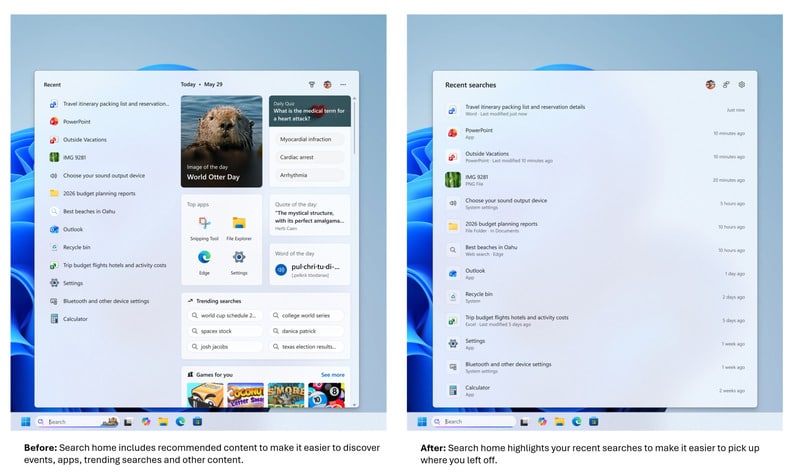
The updated search panel introduces a streamlined home screen that removes unnecessary visual friction. Historically, the search interface was saturated with image-of-the-day tiles, quizzes, and trending web searches. By eliminating these distractions, Microsoft has created a baseline environment that emphasizes recent searches. This structural change ensures that users can return to their previous workflows with maximum speed and minimal cognitive load.
Structural Autonomy Over Web Integration
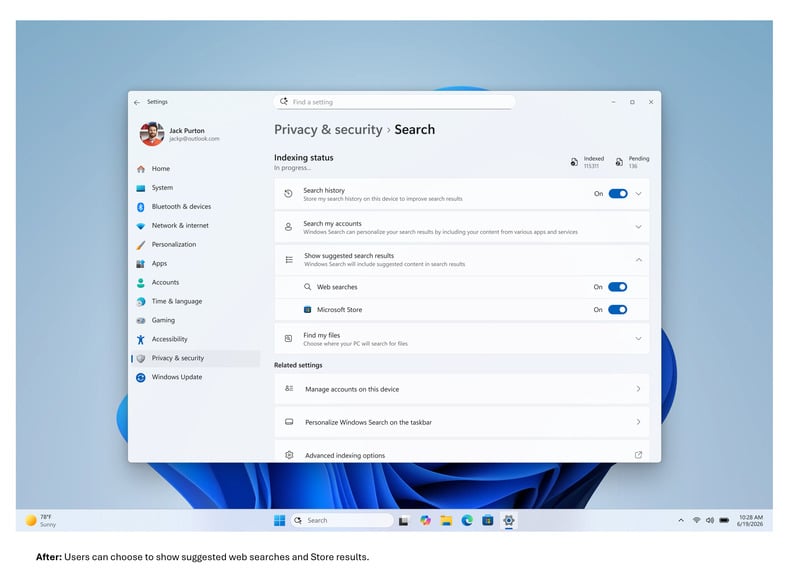
One of the most requested features is the new granular control found under Privacy & Security settings. Users can now choose to disable Microsoft Store suggestions and web results entirely within the Windows 11 Search environment. This update addresses long-standing criticisms regarding the system’s tendency to prioritize Bing results over local executable files. Furthermore, this shift empowers users to calibrate their OS for a strictly local-focused experience.
Precision-Driven Data Retrieval
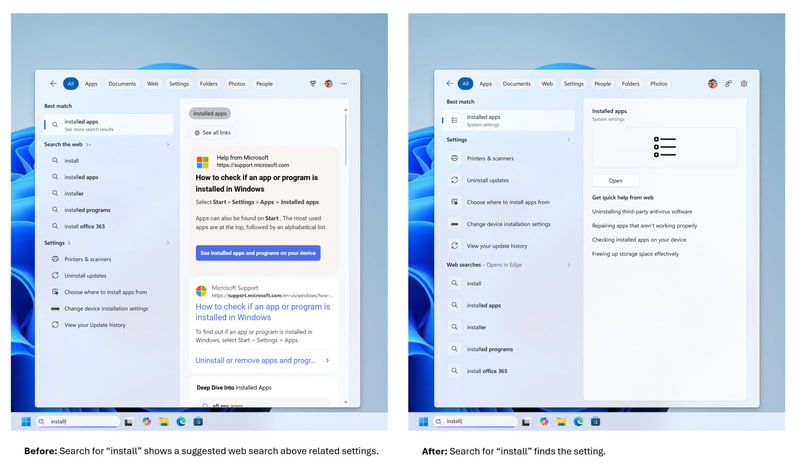
Microsoft has recalibrated the search logic to give higher priority to apps, system settings, and local files. System items like “This PC” and the “Recycle Bin” are now surfaced more reliably when they represent the strongest match. Additionally, the algorithm is becoming more forgiving; for instance, a typo like "utlook" will correctly suggest the Outlook application instead of defaulting to a generic web query. These improvements represent a significant catalyst for professional productivity.
Visual Data Verification
The redesign also enhances the preview pane for supported files. Users can now access larger previews that display file paths, types, and last-modified dates directly within the search interface. Consequently, this removes the need to open File Explorer for simple identification tasks. Features like "Open with" are also more accessible, serving as a catalyst for faster file management and improved system-wide navigation.
The Situation Room: Analysis
The Translation
In technical terms, Microsoft is decoupling its search utility from its advertising and web-tracking ecosystem. By allowing users to toggle off web results, the operating system moves away from being a “portal” for Bing and returns to being a tool for local management. This represents a pivot from monetization-first design toward a utility-first architecture.
The Socio-Economic Impact
For the Pakistani professional and student, this update reduces the bandwidth and cognitive drain caused by irrelevant web content. In environments where internet connectivity may be metered or inconsistent, a search tool that doesn’t force a web query for every local file is a vital efficiency gain. It enables faster document retrieval and reduces the distraction of “trending” global news during focused work hours.
The Forward Path
This development is a clear Momentum Shift. After years of pushing “Search-as-a-Service,” Microsoft is acknowledging that professional users demand precision over promotion. While currently in the Experimental channel, this update sets a new baseline for what a modern, respectful operating system should look like. We expect this to become a standard feature in the next major Windows 11 build.